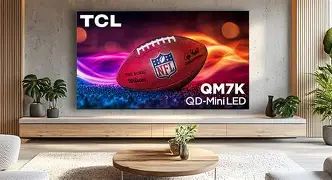
Tcl Qm7K Qd Mini Led Tv Specs, Features, and Value: Is it worth the price tag?
Introduction
Mini-LED TVs have become the “sweet spot” for many shoppers who want high brightness, strong contrast, and modern gaming features without paying flagship OLED prices. TCL’s QM7K QD-Mini LED series is aimed squarely at that buyer: someone who watches a mix of streaming shows, sports, and movies, and also wants a TV that can keep up with a PlayStation 5, Xbox Series X|S, or a high-refresh-rate PC.
The TCL QM7K blends a QD-Mini LED backlight (Mini-LED for tighter light control plus quantum dots for wider color) with a 144Hz native refresh rate, VRR support, and a feature set that checks most modern boxes: Dolby Vision IQ, HDR10+, IMAX Enhanced, and Google TV. On paper, it reads like a high-value enthusiast TV. In practice, it’s a set with real strengths—especially for bright-room viewing and HDR “pop”—but also some tradeoffs buyers should understand before calling it a bargain.
Quick specs snapshot (what matters most)
Specs can get long fast, so this section focuses on the items most buyers actually feel day to day: brightness, motion, gaming connectivity, HDR format support, and smart platform.
- Panel / backlight: QD-Mini LED LCD with local dimming (marketed as “Precise Dimming” and “Halo Control”)
- Resolution: 4K (3840 × 2160)
- Refresh rate: 144Hz native
- Gaming support: 4K @ 144Hz with VRR on two HDMI 2.1 ports; additional HDMI ports are HDMI 2.0-class; supports ALLM and FreeSync Premium Pro
- HDR formats: Dolby Vision (including Dolby Vision IQ), HDR10+, HDR10, HLG
- Smart TV: Google TV
- Audio: Dolby Atmos support; some sizes feature “Audio by Bang & Olufsen” branding (large 115-inch model uses a different multi-speaker system)
- Typical size range: widely sold across multiple sizes (commonly 55", 65", 75", 85", and 98"; TCL also markets a 115" option)
Detailed product review and analysis
1) Picture quality: why Mini-LED is the headline
The core appeal of the QM7K is its Mini-LED local dimming system. Instead of a basic edge-lit backlight (which struggles with deep blacks and HDR highlights), Mini-LED uses many small LEDs arranged behind the panel in zones. The TV can brighten and dim sections of the image independently, which is crucial for HDR scenes like city lights at night, bright reflections on water, or fireworks against a dark sky.
In real-world use, the QM7K’s strengths show up quickly in two common situations:
- Bright living rooms: Daytime sports, news, and YouTube look punchy and readable. A TV that can’t get bright enough tends to look “flat” or gray in sunlight.
- HDR streaming and discs: When HDR is done well, the QM7K can deliver intense highlights and a satisfying sense of depth—especially with Dolby Vision content.
However, Mini-LED LCD is still not OLED. In very dark viewing, some viewers will notice blooming (a halo around bright objects on dark backgrounds). TCL markets halo-reduction features, and the QM7K can look excellent for its class, but blooming is still a characteristic of this category—especially with subtitles, starfields, or UI elements on dark screens.
2) Brightness and HDR impact
Brightness is one of the QM7K’s biggest “value” arguments because it affects both HDR impact and how well the TV holds up in a sunlit room. In practice, the set can look very impressive with HDR highlights—think glints of armor, bright clouds, neon signage, or the sparkle in animated films.
It’s also important to understand brightness is not a single number. Different picture modes, window sizes, and processing choices change what you actually see. Buyers who prefer accuracy often use Filmmaker Mode or a calibrated preset; buyers who prioritize punch often use brighter modes. Either way, the QM7K is positioned as a high-brightness mini-LED model rather than a “dim but accurate” budget set.
3) Color: quantum dots help, but accuracy still depends on setup
Quantum dots primarily help the TV render a wider color gamut at higher brightness levels. That matters for HDR color volume—bright reds, greens, and blues that don’t wash out when the screen gets luminous. For typical viewing (streaming, sports, games), the QM7K’s color can look rich and vibrant.
What many buyers care about, though, is whether the TV looks “right” out of the box. Like many TVs in this segment, the QM7K may benefit from basic setup work:
- Choosing an accurate base mode (often Filmmaker Mode or Movie/Cinema)
- Turning off aggressive motion smoothing for movies
- Adjusting local dimming and contrast to reduce blooming without crushing shadow detail
Enthusiasts who calibrate (or at least fine-tune) are more likely to extract the best from the panel. Casual viewers who leave it in a vivid store mode may get maximum pop but less natural skin tones.
4) Motion handling: great for sports and gaming, but settings matter
The QM7K’s 144Hz refresh rate is a practical advantage for gaming and for high-frame-rate content. For sports, motion clarity depends on both panel response and processing. Many viewers prefer minimal interpolation (to avoid artifacts), but some like a small amount of motion smoothing for fast camera pans in hockey or soccer.
Shop the latest TVs & Home Theater picks on Amazon.
View Offers →As with many LCD TVs, pushing motion processing too far can create visible artifacts (warping around players, shimmering edges, or odd motion trails). The best approach is to start conservatively: disable soap-opera effect for film/TV content and only add motion assistance if sports looks too blurry for the room’s viewing distance.
5) Gaming features: a serious selling point—with one key limitation
For gamers, the QM7K is compelling because it supports modern console and PC features:
- 4K at up to 144Hz (useful for PC gaming and some high-frame-rate modes)
- VRR (Variable Refresh Rate) to reduce tearing/stutter
- ALLM (Auto Low Latency Mode) to automatically switch to game mode
- FreeSync Premium Pro support for compatible devices
The caveat is connectivity: the QM7K commonly provides two HDMI 2.1 ports, with the other HDMI ports being HDMI 2.0-class. That’s not a dealbreaker for everyone, but it matters for buyers with multiple next-gen devices (for example: PS5 + Xbox + gaming PC + an AVR/soundbar needing eARC). If eARC and two HDMI 2.1 ports overlap in an inconvenient way on your setup, cable routing and port planning become important.
6) Smart TV experience: Google TV is a practical advantage
Google TV tends to be a strong choice for mainstream streaming because the app library is deep and updates are frequent. For typical households, it means:
- Easy access to major streaming services
- Strong voice search and recommendations
- Chromecast-style casting support (useful for quick playback from phones and laptops)
Buyers who already live in Google Assistant ecosystems often find the integration natural. For those who dislike ads or heavy recommendation feeds, Google TV can feel busy—but it remains one of the more flexible platforms, especially compared to proprietary smart systems with fewer apps.
7) Audio: good enough to start, but many buyers will want an upgrade
Modern ultra-thin TVs rarely deliver “home theater” sound on their own, and the QM7K is no exception. It supports Dolby Atmos, but Atmos as a format doesn’t guarantee immersive output from built-in speakers. For real-world use cases:
- Dialog clarity: Often acceptable, but can vary by content mix and room acoustics.
- Movie impact: Explosions and music can sound compressed compared to even a midrange soundbar.
- Late-night viewing: A dedicated sound system often helps intelligibility at lower volumes.
Many buyers pair a TV in this class with a soundbar (or an AVR + speakers) to match the QM7K’s strong HDR visuals.
Pros and cons
Pros
- High brightness and strong HDR “pop”, well-suited to bright rooms and HDR-heavy streaming
- Mini-LED local dimming delivers deeper blacks and better contrast than typical edge-lit TVs
- Excellent gaming feature set: 4K/144Hz, VRR, ALLM, and FreeSync Premium Pro support
- Broad HDR format support, including Dolby Vision IQ and HDR10+
- Google TV provides a strong app ecosystem and convenient casting/voice features
- Strong value potential when discounted, especially versus premium-brand mini-LED competitors
Cons
- Only two HDMI 2.1 ports can be limiting for multi-console + eARC-heavy setups
- Blooming is still possible in challenging dark scenes (typical for Mini-LED LCD)
- Off-angle viewing can degrade image quality compared with OLED or wide-angle focused LCD designs
- Motion processing can introduce artifacts if pushed aggressively for sports
- Built-in audio is rarely “theater-level” despite Atmos support; many will want a soundbar
Comparison table: where the QM7K fits
The most relevant comparison for shoppers is usually between OLED, a midrange Mini-LED like the QM7K, and a step-up Mini-LED (either TCL’s higher series or a competitor’s premium model). The table below reflects typical category differences that influence buying decisions.
| Category | TCL QM7K (QD-Mini LED) | Typical OLED TV (midrange) | Typical premium Mini-LED TV |
|---|---|---|---|
| Bright-room performance | Very strong; high brightness helps overcome ambient light | Good to excellent, but often less “punchy” in sunlit rooms than top mini-LED | Excellent; often the best choice for sunlit rooms |
| Black levels in dark rooms | Deep blacks for LCD, but can show blooming in extreme scenes | Reference-level blacks with no blooming | Very deep blacks; blooming varies by model and algorithm |
| HDR highlight impact | High impact; strong specular highlights | Excellent contrast; highlight brightness varies by model | Often the most intense highlight performance |
| Viewing angles | Best when seated near center; quality drops off at wider angles | Usually excellent off-axis | Varies; some are improved, many still prefer center seating |
| Gaming features | Very strong (4K/144Hz + VRR), but typically limited HDMI 2.1 port count | Often excellent, frequently with multiple HDMI 2.1 ports on newer models | Excellent; often more HDMI 2.1 flexibility and extra gamer-centric features |
| Value (typical street pricing) | High value, especially when discounted | Higher cost for best-in-class blacks and angles | Can be expensive; value depends heavily on sales |
Value and pricing: is it worth the price tag?
Whether the QM7K is “worth it” depends on what price is being evaluated and what the buyer prioritizes. In this segment, street pricing fluctuates heavily, and the QM7K often competes less with its MSRP peer group and more with whatever is on sale that week.
When the QM7K is worth it
- Bright-room households: If the TV is used with lamps on, daylight coming in, or a wide-open living space, the QM7K’s brightness and contrast are meaningful upgrades over basic LED TVs.
- Mixed-use homes: Sports, streaming, and gaming all benefit from high brightness and strong motion/gaming support.
- HDR-first viewers: People who watch newer Dolby Vision/HDR10+ content and want visible HDR impact (not subtle HDR) usually appreciate what this panel type delivers.
- Buyers who will add external audio: If a soundbar or AVR is part of the plan, the overall “system value” improves dramatically.
When it may not be worth it
- Wide seating arrangements: If viewers sit far off-center (sectionals, open-concept rooms), an OLED or a TV optimized for wide angles may be the better spend.
- Dark-room purists: If the room is light-controlled and the viewer is sensitive to blooming, OLED remains the cleaner choice for black-level fidelity.
- HDMI-heavy gamers: Multiple HDMI 2.1 devices plus eARC can become annoying with a two-port 2.1 layout; some competing sets offer more flexibility.
- Buyers expecting premium sound: If “no soundbar” is a hard rule, prioritize TVs known for stronger integrated speaker systems.
Buying guide: how to choose the right QM7K (and avoid common mistakes)
1) Pick the right size for real rooms (not just wishful thinking)
Buyers often overspend chasing screen size without considering viewing distance and room geometry. A practical approach:
- Bedroom / small den: 55" can be plenty if seating is close and the room is narrower.
- Typical living room: 65" is a common sweet spot for mixed TV and movie use.
- Sports and family movie nights: 75"–85" can feel like a major upgrade if the room supports it.
- Big “wow” installs: 98"+ becomes a room-design decision (mounting, stand depth, doorway clearance, and wall structure matter).
Also consider that bigger LCDs can make blooming more noticeable in some conditions because the bright object’s halo can be easier to spot at larger scale. That doesn’t mean “don’t go big,” but it’s a reason to be realistic about expectations for dark-room viewing.
Looking for the best TVs & Home Theater deals on Amazon?
See Deals →2) Think through HDMI usage before buying
The QM7K’s two HDMI 2.1 ports are adequate for many households, but planning saves frustration. Before purchase, list what will be plugged in:
- Soundbar/receiver via eARC
- PS5
- Xbox Series X|S
- Gaming PC
- Streaming box (if not using built-in apps)
- Blu-ray player
If more than two devices truly need HDMI 2.1 features simultaneously, shoppers should either plan for switching (receiver, HDMI 2.1 switch, or manual swapping) or consider a model with more HDMI 2.1 bandwidth ports.
3) Decide what matters more: bright-room “punch” or dark-room perfection
This is the most important buying decision in 2026 TV shopping. The QM7K is typically the better pick for:
- Bright rooms where HDR highlights and sports need to stay vivid
- All-day TV usage where glare and ambient light are constant
OLED typically wins for:
- Nighttime movie watching with lights down
- Subtitle-heavy viewing where blooming around text is distracting
4) Plan for audio as part of the total budget
If a buyer is stretching to get the QM7K for its picture performance, the smartest “next dollar” is often better sound. Even a modest soundbar can improve:
- Dialog clarity in TV shows
- Volume consistency between quiet scenes and action peaks
- Immersion for movies and games
That matters because the QM7K’s strong HDR visuals can feel “unmatched” if audio remains thin.
5) Setup tips that improve everyday satisfaction
Without getting overly technical, these practices tend to help most buyers:
- Use an accurate picture mode (often Filmmaker Mode / Movie) for films and prestige TV.
- Disable or reduce motion smoothing for movies to avoid the soap-opera effect.
- Use Game Mode for consoles/PC to ensure low latency.
- Experiment with local dimming settings to find a personal balance between deep blacks and minimal blooming.
Conclusion
The TCL QM7K QD-Mini LED TV is a compelling “performance-per-dollar” option for buyers who want high brightness, strong HDR impact, and serious gaming support in a mainstream price tier. Its Mini-LED local dimming and quantum-dot color help it look bold and lively in the exact environments many TVs struggle with: living rooms with windows, sports with lots of motion, and HDR streaming that benefits from intense highlights.
It isn’t the perfect TV for every use case. Shoppers with wide seating layouts, dark-room purist preferences, or multiple HDMI 2.1 devices may find an OLED or a more connectivity-rich mini-LED model worth the extra spend. But for the buyer profile TCL is targeting—mixed usage, bright rooms, HDR-heavy streaming, and modern console/PC gaming—the QM7K often justifies its price tag, especially when it’s available at competitive real-world pricing.