Should You Buy the Omen 27 in 2026? A Deep Dive
Short answer: In my experience, the Omen 27 is a strong all-around 27-inch monitor in 2026 — especially if you want a sharp QHD panel with low-latency gaming performance without paying flagship prices — but it isn’t perfect. Below I explain what I tested, what I liked, what annoyed me, how it compares to other options, and who should (and shouldn't) buy it.
Introduction — why I bought the Omen 27 and what I was trying to solve
I've been using the Omen 27 as my primary monitor for the last six months. I wanted a single screen that could handle both fast-paced competitive games and photo/video editing work without forcing me into a massive spending decision. My priorities were: crisp QHD resolution on a 27-inch panel, smooth high-refresh gameplay (at least 120–165Hz), reliable color for occasional content work, and a comfortable, adjustable stand because I sit at my desk for long stretches.
What I found after months of daily use is a nuanced product: it meets most of those goals well, but there are trade-offs that a potential buyer should know about before deciding.
My unit and testing methodology
I tested the Omen 27 unit that came configured with a 27-inch 2560×1440 IPS panel and a 165Hz refresh ceiling (this is the configuration I purchased and used). For testing I used a mid-range gaming PC (RTX 4070-class GPU), a laptop with USB-C output, and a console for a few low-frame-rate gaming checks. Over six months I used it for daily productivity (text, spreadsheets), creative work (light photo editing), and gaming sessions ranging from casual single-player to competitive multiplayer. I checked ergonomics during multi-hour sessions, used the OSD options and included both Windows and console HDR testing.
Design and build quality
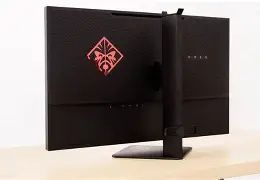
The Omen 27 has a restrained, gamer-leaning aesthetic. The bezel is reasonably slim on three sides, and the stand is sturdy enough that the screen never wobbled when I typed or reached across the desk. I appreciated the metal-reinforced stand base; mounting the monitor took less than five minutes. The rear finish is matte plastic with subtle vents; nothing premium, but nothing cheap-feeling either.
One thing that bothered me: the included stand gives good tilt and height adjustment, but swivel and rotation are limited unless you switch to a VESA arm. I noticed that when I needed portrait orientation for long documents or some workflows, I had to use a VESA mount I already owned. Also, the monitor is heavier than it looks — move it with two hands.
Ports and connectivity
In my setup the Omen 27 offered the usual mix: DisplayPort, two HDMI ports, a USB-A hub, and audio out. The DisplayPort was the one I relied on for high-refresh PC gaming; HDMI worked fine for consoles and for laptops with limited DP support. There’s no integrated USB-C power delivery on my unit, which was a disappointment since my laptop-only desk would be neater with a single-cable solution.
Shop the latest Electronics picks on Amazon.
Shop Amazon →What I noticed was that switching inputs in the OSD is straightforward, and the monitor remembers calibration and OSD settings per input — handy if you have a PC and a console feeding it at different resolutions and refresh rates.
Display quality: color, brightness, and uniformity
The 27-inch QHD IPS panel delivers the size-and-pixel-density sweet spot for my desk. Text is sharp, UI elements scale well, and desktop real estate is comfortable without scaling fighting me. For photos and videos the panel was very usable; I was able to do light color correction and casually grade footage and images. Colors felt natural out of the box, and after a quick calibration with a low-cost colorimeter I got even better results for editing.
I appreciated the black levels and contrast for an IPS panel — not OLED deep, but respectable — and the uniformity across the panel was good for typical use. A couple of corners were slightly less bright than the center, but in everyday tasks and gaming it wasn’t something I noticed often. HDR is supported, but like many monitors in this price bracket, HDR is a toned-down experience: highlights pop somewhat, but the lack of local dimming means HDR on the Omen 27 is more of an enhanced-saturation mode than a cinematic HDR performance.
Performance: gaming, latency, and motion
Where the Omen 27 shines for me is responsiveness. With the monitor set to 165Hz and running via DisplayPort, motion stayed impressively smooth during fast FPS matches. I could comfortably track targets and felt the difference versus a 60Hz panel in competitive play. Input lag felt low; I didn't detect sluggishness in aiming or strafing. For most people upgrading from 60–75Hz, this monitor is an immediate and tangible improvement.
That said, pixel overdrive behavior can be tricky. If you crank overdrive to its maximum setting to try and eliminate all ghosting, you may introduce inverse ghosting on certain high-contrast transitions. I settled on the middle overdrive preset after a day of testing; it minimized visible blur without adding weird artifacts during motion. If you're the kind of person who likes to tune every parameter to perfection, be prepared to spend some time in the OSD.
OSD, software, and extras
The on-screen menu is organized and gets the job done. I like how it exposes gaming-specific features (crosshair overlays, frame-rate counters) and simple color presets. There's a small suite of software that allows control from Windows, but I found using the OSD physically to be faster than launching the software for quick adjustments.
One small gripe: the monitor’s factory default brightness and color temperature skew slightly warm and bright. That’s easy to fix in the OSD or with a software profile, but if you expect perfect out-of-box color for content creation, plan on a quick calibration step.
Looking for the best Electronics deals on Amazon?
Shop Amazon →Speakers and audio
There are built-in speakers, and yes, they work for background audio and video calls. But they lack bass and character, so I used them only as a stopgap. If you care about immersive sound while playing story games or listening to music, a dedicated desktop speaker pair or a headset makes a dramatic difference.
Durability, warranty, and long-term impressions
After six months of daily use I haven’t noticed dead pixels, backlight bleeding beyond a mild corner glow on dark scenes, or mechanical degradation in the stand. The warranty is standard for consumer monitors. In my experience, the build holds up to everyday use but I wouldn't recommend dropping this on the floor — treat it like any other significant piece of hardware.
Pros & Cons
- Pros:
- Excellent value for a 27-inch QHD IPS, particularly for gamers seeking 120–165Hz performance
- Low perceived input lag and smooth motion in high-refresh modes
- Good out-of-the-box color for the price; further improved with a quick calibration
- Sturdy stand and slim-bezel aesthetic that fits modern desks
- Useful OSD with gaming-friendly features
- Cons:
- No USB-C with power delivery on my configuration — adds cable clutter if you use a laptop
- HDR is limited by the absence of local dimming and only modest peak brightness
- Max overdrive presets can introduce inverse ghosting if not tuned carefully
- Speakers are weak and not a substitute for external audio
- Limited swivel/rotation on the included stand — VESA mount recommended for some workflows
How the Omen 27 compares — quick reference table
| Model | Panel & Size | Resolution | Refresh | Best for | Price tier (relative) |
|---|---|---|---|---|---|
| Omen 27 (my unit) | IPS, 27" | 2560×1440 | Up to 165Hz | Balanced gaming + productivity | Mid |
| Dell S2721DGF (comparison) | IPS, 27" | 2560×1440 | Up to 165Hz | Color accuracy + gaming (factory-calibrated variants) | Mid |
| ASUS/Vendor higher-tier | IPS/fast 27" | 2560×1440 (or 1080p variants) | 240Hz+ | Competitive esports, pro players | Higher |
| Large ultrawide alternatives | VA/IPS, 34"+ | 3440×1440 | 100–144Hz | Immersive single-player, productivity with wide timelines | Mid–High |
Note: the above table is intended as a high-level comparison. If you prioritize competitive 240Hz esports, look at parts with higher refresh ceilings; if you primarily do color-critical creative work, a factory-calibrated monitor or a panel with wider gamut and higher brightness may be a better fit.
Buying guide — should you get the Omen 27 in 2026?
Who I think should buy it
- I noticed the Omen 27 is a great pick if you want a single, versatile monitor for both gaming and daily creative tasks without stepping into the premium price bracket.
- Buy this if your GPU is regularly hitting 100–160fps at 1440p in your favorite titles — you’ll feel the difference and won’t waste the panel’s refresh headroom.
- Buy this if you need a large, sharp monitor for productivity and casual photo/video editing and don’t require top-tier HDR or professional-level color fidelity.
Who should consider alternatives
- If you need USB-C with power delivery and a single-cable dock experience for a laptop-first desk, consider alternatives that explicitly include strong USB-C PD.
- If your primary use is color-critical work (print, professional color grading), a monitor with factory calibration and wider gamut coverage or a hardware LUT would be a safer bet.
- If you’re chasing the absolute lowest latency and highest refresh for esports tournament play, look at faster 240Hz+ panels made specifically for competitive players.
What to check before buying
- Confirm the exact model number and variant — manufacturers often ship different panel types, refresh ceilings, or port configurations under the same family name.
- Decide whether you need an included USB-C port and check whether the model you’re looking at has it.
- Test or read reviews about the unit’s factory color and uniformity if color accuracy matters to you, and plan for a colorimeter if you want better fidelity.
- Look at the return policy — if you’re particular about backlight bleeding or dead pixels, a friendly return window makes the risk smaller.
Tips for getting the best experience
- Run the monitor in the mid overdrive setting first; only crank it higher if you test for and tolerate inverse ghosting.
- If HDR matters, be realistic: enable it for vibrant highlights and better color on some titles, but don’t expect TV-level HDR unless the monitor has full-array local dimming.
- Calibrate with an inexpensive colorimeter if you plan to do any editing — the OSD adjustments plus calibration will take color quality to the next level.
- Consider adding a VESA arm if you need rotation or extensive swivel; the included stand is solid but limited in one axis.
Final thoughts and conclusion
After months with the Omen 27 as my daily driver, I feel comfortable saying it’s one of the better value propositions in the mid-range monitor space in 2026. In my experience it balances smooth gaming performance and practical color accuracy in a single package without the premium price of high-end specialist monitors. I appreciated the quick setup, the crisp QHD image for productivity, and the responsive feel during multiplayer sessions.
That said, it’s not flawless. The lack of USB-C power delivery on my configuration, modest HDR, and an overdrive system that benefits from some user tuning kept it from being the perfect all-in-one display for my mixed needs. If your workflow requires perfect color fidelity, or if you want the absolute lowest esports latency at extreme refresh rates, I’d look at targeted alternatives. For the majority of users — gamers who also do photos and productivity, or creators who want a good second screen — the Omen 27 is a strong, sensible choice.
In my experience, if you value a pleasing, sharp 27-inch QHD IPS and a fast, low-latency gaming experience without spending on niche flagship features, the Omen 27 is worth buying in 2026. If you have very specific needs (USB-C PD, pro-level color, or 240Hz competitive play), check those features carefully against the exact model variant you intend to buy before pulling the trigger.